This is really cool. It's a video so if you have a dialup connection it may take a little while to load.
It does fast forward about 45 seconds into the video so this is normal. Watch it all the way to the end so you can see what's "printed."
Link to video
Thursday, March 30, 2006

Sunday, March 26, 2006
New Online Word Processor
Thanks to Stephen over at Stephen's Untold Stories for pointing me to this online word processor called ajaxWrite. Be careful though. It doesn't work in Internet Explorer. You'll need Firefox to open it.
Mouse Dead?
Many times I observe a user panic when the mouse is frozen and no longer seems to function. Most of the time, a reboot of the computer will take care of this. However, the keyboard can be used for many functions. Here is Microsoft's page on keyboard shortcuts.
Saturday, March 25, 2006
The IP Address
This is a short little tutorial on the IP address. What is an IP address? First of all, IP is short for Internet Protocol. The IP address is made up of octets of binary code, but we see actual numbers instead. There are 4 parts to the IP address. It may look something like 192.168.1.1. In binary form, it would look something like the following: 11000000.10101000.00000001.00000001. To find your IP address of your computer that is currently connected to a network, go to Start, Run, type cmd, and in the MS-DOS window type "ipconfig" without the quotes. There will be some numbers pop up and the ones next to IP address are the ones you will be looking for. However, if you have a router on your home network, you will see the IP address of your computer as it appears on your home network. This is not the IP address of your computer when it is connected to the Internet. Your router has this address stored in its management console. To find out your WAN (Wide Area Network or in this case, IP address on the Internet) you must go into your router's configuration to see it. Addresses that begin with 10.x.x.x, 172.x.x.x, and 192.x.x.x are private addresses and are addresses your LAN will use. Your ISP has a block of addresses that it can assign to either your computer (if not connected to a home network) or to your router. To see what your IP address on the Internet is, go to IP Address World.
Standardized Tests
There's an interesting article in the New York Times today about standardized tests and how many are being given in this day and age.
Link to Article (may require registration)
Link to Article (may require registration)
Friday, March 24, 2006
Need to Print from Several Computers in Your Home?
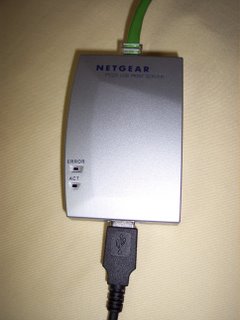
This is a quick and easy setup for using a print server. A print server, such as the one shown below, will enable a USB printer to be placed on your home network and accessible to anyone using any computer. The USB cable attaches to one end of the server, and the other end attaches to the printer. The network cable is attached to the other end of the print server and its opposite end is attached to your switch or router. Of course, there is also a power adapter. It is just not shown in this picture.
 Now you are ready to use the software. This particular print server is made by Netgear. I have found it very good for what I do. There are other brands, such as Linksys, and there are also some wireless models available. This is really just a preference of the user. You can even find printer switches available, but I didn't have very good luck with that choice. I recommend the type of setup I am using here.
Once you have the physical setup, insert the disk that came with your print server. The following graphics are from the Netgear setup utilities. This print server is very simple to set up.
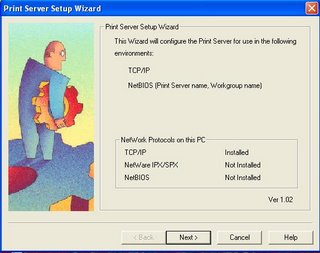
Start the Print Server Setup Wizard and the above screen will appear. Click Next.
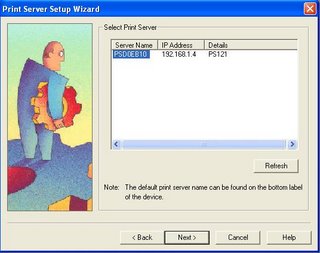
Select your printer from the list above. Click Next.
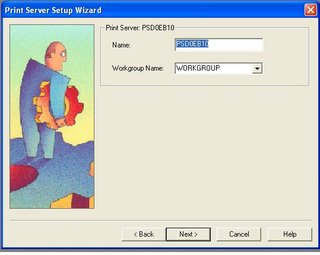
Select your printer name and network name. Click Next.
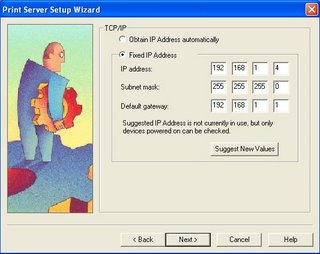
I recommend using a static IP address for your printer. This way, the computer always knows the address of the printer on your network. If you set it to automatic, your IP address may change each time you login to your computer. Make sure you set it to an address that is in your IP schema range and is not already in use. Click Next.
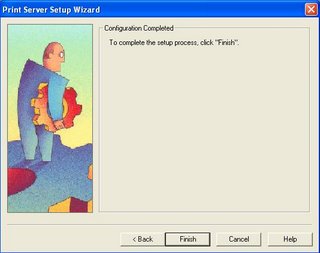
All Done! Now it's time to add the IP port to your computer. Start the Add Printer Port Wizard. Just keep clicking Next until your printer is added. Do this to all of your computers where you'll need to print. Make sure you have the printer's drivers loaded. That's all there is to it!!
 Now you are ready to use the software. This particular print server is made by Netgear. I have found it very good for what I do. There are other brands, such as Linksys, and there are also some wireless models available. This is really just a preference of the user. You can even find printer switches available, but I didn't have very good luck with that choice. I recommend the type of setup I am using here.
Once you have the physical setup, insert the disk that came with your print server. The following graphics are from the Netgear setup utilities. This print server is very simple to set up.

Start the Print Server Setup Wizard and the above screen will appear. Click Next.

Select your printer from the list above. Click Next.
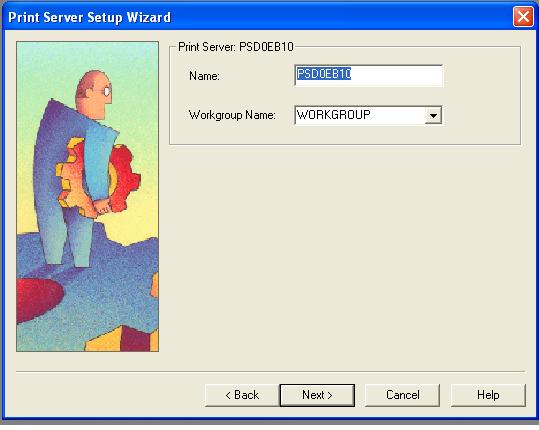
Select your printer name and network name. Click Next.
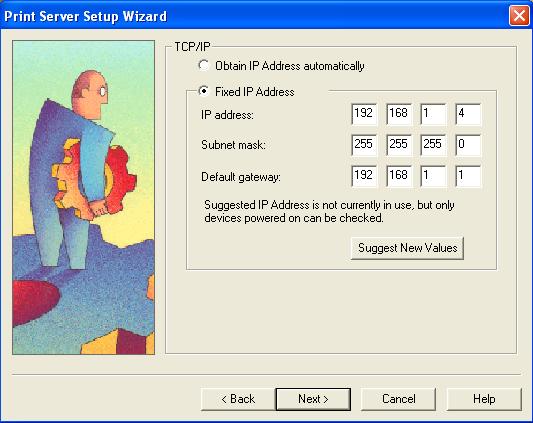
I recommend using a static IP address for your printer. This way, the computer always knows the address of the printer on your network. If you set it to automatic, your IP address may change each time you login to your computer. Make sure you set it to an address that is in your IP schema range and is not already in use. Click Next.

All Done! Now it's time to add the IP port to your computer. Start the Add Printer Port Wizard. Just keep clicking Next until your printer is added. Do this to all of your computers where you'll need to print. Make sure you have the printer's drivers loaded. That's all there is to it!!
Thursday, March 23, 2006
Hello Again
I haven't written anything for several days mainly because nothing really very newsworthy has jumped out at me. I've read the headlines, kept up with some techno stuff, and I guess I just don't see anything that impresses me. I mean, for example, who was taken by surprise that the Vista lauch would be delayed????
Sometimes I just get writer's block, not that I write all that well anyway. I don't know what else to call it when I just don't have anything to say. I've been working a lot lately, and I'm just really, really tired when I get home. I am very exhausted right now. This will be short and sweet.
If you have a question about some little technical issue or know-how, just leave a comment below. I will see what I can do to answer them.
Sometimes I just get writer's block, not that I write all that well anyway. I don't know what else to call it when I just don't have anything to say. I've been working a lot lately, and I'm just really, really tired when I get home. I am very exhausted right now. This will be short and sweet.
If you have a question about some little technical issue or know-how, just leave a comment below. I will see what I can do to answer them.
Wednesday, March 15, 2006
Security Tips
This site is several months old, but it still contains some very useful information. I recommend it for everyone. It is from pcmag.com. Learn how to recognize possible security threats and how to avoid them.
Link to Article
Link to Article
Monday, March 13, 2006
For Big Files
Have a really big file you'd like to send someone? Sometimes email accounts have limits as to how much space they will hold. Gmail is great for large items, and it will hold over 2 GB of space. There is another online service called dropload.com where you can drop off your files for someone to pick up at a later time. Files are removed after 7 days. It's perfect for mp3 files, videos, etc. It will hold 100 MB of space. Not as big as Gmail, but useful nonetheless. Just don't store copyrighted items there.
Thanks to Jason for this tip!
Dropload
Thanks to Jason for this tip!
Dropload
Sunday, March 12, 2006
Another Browser

I came upon another browser today. It's called Maxthon. It has tabbed browsing and a built in RSS reader. It has gobs of different settings and views. Try it out!
Subscribe to:
Posts (Atom)